SnapTTK TikTok Video Downloader Extension for PC – Download Videos in One Click

Downloading TikTok videos on a desktop computer often involves several unnecessary steps. You have to copy the video URL, open a downloader website, paste the link, process it, and then save the file. This process may be manageable for one video, but it quickly becomes repetitive when you download TikTok content regularly.

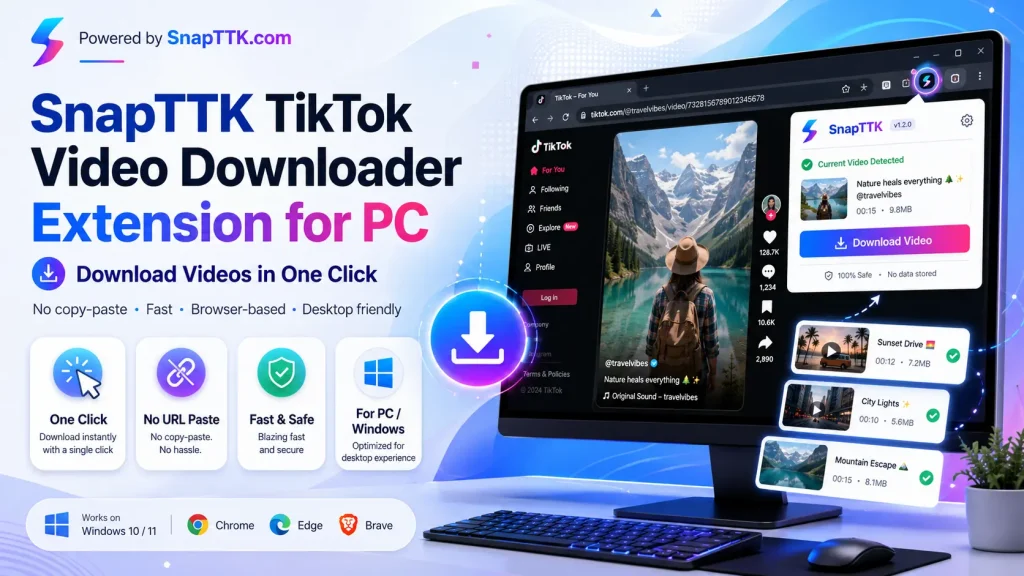
The SnapTTK Video Downloader Extension for PC simplifies the entire process. Once you install the extension in your desktop browser, you can open the TikTok video you want to save, click the SnapTTK extension, and access the available download option immediately. You no longer need to copy and paste the TikTok URL into a separate tool every time.

SnapTTK TikTok Video Downloader Extension for PC – Download Videos in One Click

What Is the SnapTTK TikTok Downloader Extension?

The SnapTTK extension is a browser-based TikTok downloading tool designed for desktop and PC users. It connects the downloading process directly to your browser, allowing you to save publicly available TikTok videos while viewing them on TikTok.

Instead of moving between TikTok and an online downloader, the extension keeps the process in one place. Open the video, click the SnapTTK extension icon, and select the available download option.

This streamlined workflow makes the extension useful for people who frequently save TikTok videos for offline viewing, content research, educational reference, or creative inspiration.

How the SnapTTK Extension Works

Using the SnapTTK TikTok video downloader extension requires only a few simple steps.

First, install the extension in a supported desktop browser. Next, open TikTok and visit the video you want to download. Click the SnapTTK icon in your browser toolbar, wait for the extension to detect the active TikTok video, and then choose the available download option.

The video will save to your computer’s default Downloads folder unless you have selected another download location in your browser settings.

There is no need to copy the TikTok link, open another tab, or paste the URL manually.

How to Download TikTok Videos on PC with SnapTTK

Follow these steps to download a TikTok video using the SnapTTK browser extension:

  1. Install the SnapTTK extension in your supported desktop browser.
  2. Open TikTok on your PC or desktop computer.
  3. Find and open the public TikTok video you want to save.
  4. Click the SnapTTK extension icon in the browser toolbar.
  5. Select the available video download option.
  6. Save the file to your computer.

The exact download location depends on your browser settings. Most browsers save files in the Downloads folder by default.

No More Copying and Pasting TikTok URLs

The main advantage of the SnapTTK extension is convenience. Traditional online TikTok downloaders require users to copy the video link and paste it into a separate website. The SnapTTK extension removes this repetitive step.

When you are already watching a TikTok video on your computer, the extension can provide the download option from the same browser window. This reduces unnecessary clicks and creates a faster workflow for regular users.

The extension is especially helpful when you need to save several videos individually because you do not have to repeatedly switch tabs and paste new links.

Why Use a TikTok Downloader Extension on PC?

A desktop extension provides a more direct downloading experience than a traditional website-based tool. It stays accessible from your browser toolbar and works while you browse TikTok.

Faster Downloading Workflow

You can start the download process directly from the active TikTok video page. This makes the experience quicker than copying and pasting each URL manually.

Easy Desktop Access

The downloaded video saves directly to your PC, making it easier to organize files, watch them offline, or move them into editing and project folders.

No Repeated URL Entry

You do not need to enter the video address into SnapTTK every time. The extension reduces the manual work involved in downloading individual TikTok videos.

Useful for Frequent Users

People who regularly download public TikTok videos may find a browser extension more convenient than opening an online tool for every video.

SnapTTK Extension vs Online TikTok Downloader

Both options can help users save TikTok videos, but they suit different needs.

FeatureSnapTTK ExtensionOnline Downloader
Copy and paste URLNot normally requiredRequired
Access methodBrowser toolbarSeparate website
Best forFrequent PC usersOccasional downloads
InstallationOne-time extension setupNo installation
WorkflowOpen, click and downloadCopy, paste and download

An online downloader remains useful when you only need to save a video occasionally or cannot install browser extensions. The SnapTTK extension offers a more efficient option for desktop users who download TikTok videos regularly.

Who Can Benefit from the SnapTTK Extension?

The extension can support several types of users.

Content creators may save public TikTok videos for trend research, editing references, or creative inspiration. Social media managers can use downloaded clips while studying formats, hooks, captions, and content styles. Students may save educational TikToks for offline reference, while everyday users may simply want to keep their favorite public videos on a desktop computer.

Downloading a video does not transfer ownership of the content. Always respect the original creator’s rights and obtain permission before reposting or using someone else’s work commercially.

Where Are Downloaded TikTok Videos Saved?

In most desktop browsers, downloaded files appear in the default Downloads folder.

On Windows, you can usually find the file by opening File Explorer and selecting:

This PC → Downloads

You can also open your browser’s download history to locate the file. The keyboard shortcut is commonly:

Ctrl + J

Your browser may ask where you want to save each file if you have enabled that option in the download settings.

Does the SnapTTK Extension Work on Desktop Computers?

The SnapTTK extension is intended for desktop browser use. It provides a practical workflow for Windows PCs, laptops, and compatible desktop browser environments.

Browser compatibility should be clearly listed on the official SnapTTK extension page so users can confirm whether their current browser version is supported before installation.

Is the SnapTTK TikTok Downloader Extension Safe?

Users should only install the SnapTTK extension from an official SnapTTK page or a verified browser extension listing.

Before installing any browser extension, review the permissions it requests. A downloader extension should only request permissions directly related to detecting the current TikTok page and processing the selected public video.

Avoid unofficial copies or extensions that request unrelated access to passwords, messages, browsing data, contacts, or personal accounts.

The extension should not require your TikTok username or password to process a publicly accessible video.

Can the Extension Download Private TikTok Videos?

The SnapTTK extension should only be used with publicly available TikTok content that you can access normally in your browser.

It should not bypass private accounts, restricted posts, deleted videos, or content that requires unauthorized access. Any service claiming that it can secretly access private TikTok videos should be treated with caution.

Why Choose the SnapTTK Extension?

The SnapTTK TikTok Video Downloader Extension for PC is designed to remove the repetitive steps involved in desktop downloading. It brings the download option closer to the content you are already viewing and reduces the need to copy links manually.

Its main advantages include:

  • Direct access from the browser toolbar
  • No repeated copying and pasting of TikTok URLs
  • Simple desktop downloading workflow
  • Quick access while browsing TikTok
  • Convenient file saving on a PC
  • Suitable for users who download videos regularly

Frequently Asked Questions

What is the SnapTTK TikTok downloader extension?

The SnapTTK extension is a desktop browser tool that helps users access a download option while viewing a public TikTok video. It reduces the need to copy the video URL and paste it into a separate downloader.

How do I download a TikTok video with the extension?

Open the TikTok video on your PC, click the SnapTTK extension icon, and select the available download option. The file will normally save to your browser’s Downloads folder.

Do I need to paste the TikTok video URL?

The extension is designed to detect the TikTok video currently open in your browser, so you do not normally need to copy and paste its link manually.

Does the SnapTTK extension work on Windows?

The extension is designed for desktop and PC use. Users should check the official SnapTTK listing for current Windows browser compatibility and installation requirements.

Do I need a TikTok account?

Public TikTok videos should not require you to provide your TikTok login details to the downloader. Never enter your TikTok password into an unofficial extension or downloading service.

Where can I find the downloaded video?

Most browsers save downloaded videos in the Windows Downloads folder. You can also press Ctrl + J to open your browser’s download history.

Can I use the extension for private videos?

No legitimate downloader should bypass private account controls or restricted content. Use the extension only for publicly accessible videos and respect the creator’s rights.

Final Thoughts

The SnapTTK TikTok Video Downloader Extension for PC offers a simpler way to save public TikTok videos on a desktop computer. Instead of repeatedly copying links, opening a separate downloader, and pasting each URL, users can access the download process directly from their browser.

Open the TikTok video, click the SnapTTK extension, select the available download option, and save the file to your PC. This streamlined process makes SnapTTK a practical choice for desktop users who want a faster and more convenient TikTok downloading workflow.

Similar Posts

Leave a Reply

Your email address will not be published. Required fields are marked *