SnapTTK

TikTok Video Downloader – Without Watermark in HD Quality

SnapTTK is a fast and simple TikTok video downloader that lets you save public TikTok videos directly to your device. Copy a TikTok video link, paste it into the download box, and save the video without the moving watermark in the best available HD quality.
There is no complicated setup, TikTok login, or software installation required. SnapTTK works directly in your browser on Android, iPhone, Windows, Mac, Chromebook, and other modern devices.

What Is a TikTok Video Downloader?

A TikTok video downloader is an online tool that converts a public TikTok video link into a downloadable video file.
Instead of recording your screen or installing an unfamiliar application, you can copy the link of a TikTok video and paste it into an online downloader. The tool processes the link and provides an available MP4 file that can be saved to your phone, tablet, or computer.

SnapTTK is a fast, free, and reliable TikTok video downloader online tool, making this process quick and easy. It allows users to download TikTok videos without watermark while preserving the best video quality available from the source.

TikTok Video Downloader – Without Watermark in HD Quality

With SnapTTK, you can:

  • Download public TikTok videos using a link
  • Save videos without the moving TikTok watermark
  • Get the best available HD video quality
  • Download videos in MP4 format
  • Use the tool without a TikTok login
  • Access the downloader from mobile and desktop browsers
  • Save videos for offline viewing
  • Download your own videos for editing or backup

The entire process takes place through a web browser, making SnapTTK a convenient video downloader for TikTok users on different devices.

Why People Download TikTok Videos

People download TikTok videos for many different reasons. Some want to watch videos offline while traveling, while others save tutorials, recipes, educational clips, workout routines, or creative inspiration.

Some of the most common reasons include:

  • Watching videos without an internet connection
  • Saving educational content
  • Collecting favorite recipes
  • Keeping workout videos
  • Sharing videos with family and friends
  • Studying trends and editing styles
  • Creating personal collections
  • Saving inspirational content

    Downloading videos makes it much easier to access your favorite content anytime without searching for it again.

Why Choose SnapTTK Downloader Over Other TikTok Video Downloaders Without Watermark?

There are hundreds of TikTok downloaders available online, but not all of them provide a smooth user experience. Some websites are filled with intrusive ads, while others limit download quality or require unnecessary registration. SnapTTK focuses on speed, simplicity, and high-quality downloads.
With SnapTTK, you can:

No Watermark
Download clean TikTok videos without the moving TikTok logo or username overlay. The downloaded videos are suitable for saving your own content, editing authorized videos, creating backups, or watching offline.

HD Quality Downloads
SnapTTK downloads the best video quality available from the original source. When an HD version is available, the video is saved with clear visuals and minimal quality loss.

No Login Required
You do not need to create an account, sign in, or connect your TikTok profile. Simply copy the link of a public TikTok video, paste it into SnapTTK, and start downloading.

Fast and Secure
SnapTTK processes TikTok video links quickly through your browser. You are not required to provide your TikTok password, verification code, or private account information.

Works on All Devices
SnapTTK is compatible with Android, iPhone, iPad, Windows, macOS, Linux, Chromebook, and other devices that support a modern web browser.

If you are looking for an up-to-date TikTok video downloader that works smoothly in 2026, SnapTTK provides totally latest TikTok video downloader, a simple way to download public TikTok videos without watermark in the best available HD quality.

Free TikTok Video Downloader Online – No App Required

SnapTTK works completely online, so you do not need to install a mobile app, desktop program, APK file, or browser extension.

  • No software installation
  • No unnecessary device permissions
  • No extra app taking up storage space
  • No TikTok account connection
  • Easy access from any modern browser

To download a video, open SnapTTK.com, paste the link of a public TikTok video into the download box, and press the Download button.
SnapTTK processes the link directly in your browser and provides the available video file for saving to your device. The tool works on Android, iPhone, iPad, Windows, macOS, Linux, and Chromebook.
Because there is no separate application to install, SnapTTK offers a simple and convenient alternative to traditional TikTok downloader apps.

How to Download TikTok Videos Without Watermark

How to Download TikTok MP3 Music Online

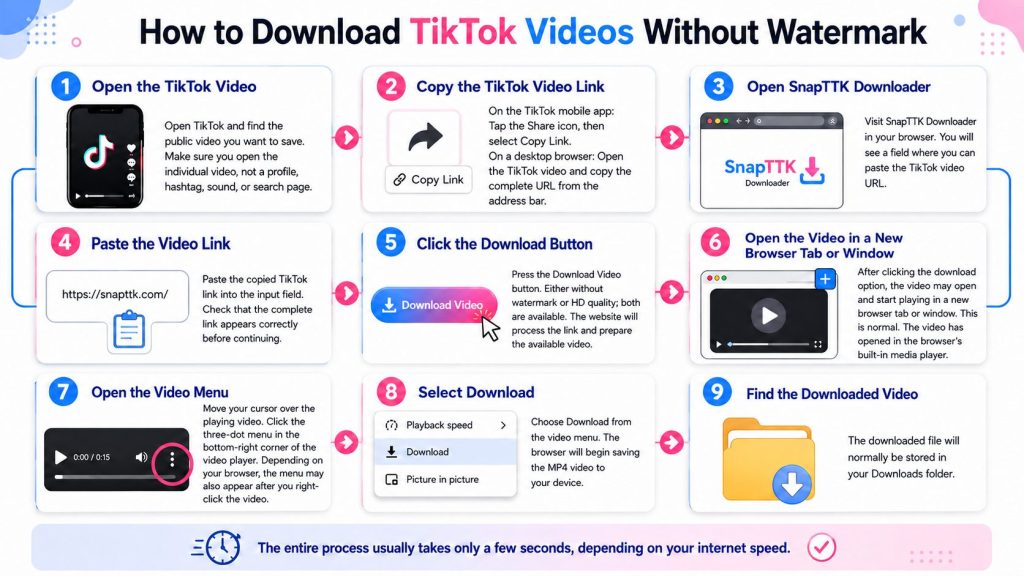
Step 1: Open the TikTok Video
Open TikTok and find the public video you want to save.
Make sure you open the individual video rather than a profile, hashtag, sound, or search page.

Step 2: Copy the TikTok Video Link
On the TikTok mobile app: >>Tap the Share icon. >> Select Copy Link.
On a desktop browser: >>Open the TikTok video. >> Copy the complete URL from the browser’s address bar.

Step 3: Open SnipTTK Downloader
Visit SnipTTK Downloader in your browser. You will see a field where you can paste the TikTok video URL.

Step 4: Paste the Video Link
Paste the copied TikTok link into the input field. Check that the complete link appears correctly before continuing.

Step 5: Click the Download Button
Press the Download Video button. Either without watermark or HD quality; both are available
The website will process the link and prepare the available video.

Step 6: Open the Video in a New Browser Tab or Window
After clicking the download option, the video may open and start playing in a new browser tab or window.
This is normal. The video has opened in the browser’s built-in media player.

Step 7: Open the Video Menu
Move your cursor over the playing video.
Click the three-dot menu that appears in the bottom-right corner of the video player.
Depending on your browser, the menu may also appear after you right-click the video.

Step 8: Select “Download”
Choose Download from the video menu.
The browser will begin saving the MP4 video to your device.

Step 9: Find the Downloaded Video
The downloaded file will normally be stored in your Downloads folder.

The entire process usually takes only a few seconds, depending on your internet speed.

Totally Latest TikTok Video Downloader for 2026

TikTok changes often, and older download tools may stop working when the platform updates. SnapTTK is regularly maintained to stay compatible with current TikTok video links and formats.

As a totally latest TikTok video downloader, SnapTTK is built to:

  • Support newly uploaded and trending videos
  • Process current TikTok link formats
  • Maintain fast download performance
  • Provide a smooth and reliable user experience

This helps users download public TikTok videos with fewer interruptions.

Why Download TikTok Videos Without Watermark?

Many users prefer videos without the TikTok watermark because they provide a cleaner viewing experience. A watermark-free version is often easier to watch offline and is useful for personal collections, presentations, or educational references.
SnapTTK is useful for:

  • Content creators saving their original videos
  • Social media managers organizing authorized content
  • Digital marketers collecting campaign references
  • Video editors working with permitted material
  • Educators and students saving useful resources
  • Casual users watching public videos offline

It’s important to respect creators’ rights and use downloaded content responsibly. If you plan to repost someone else’s content publicly, always make sure you have permission or follow the applicable platform rules and copyright requirements.

Download TikTok Videos in HD Quality

Video quality matters, especially when you want to save tutorials, travel clips, cooking videos, sports highlights, or creative content. Low-resolution downloads often appear blurry on larger screens, making the viewing experience less enjoyable.

Supported Video Qualities – HD, Full HD, 4K, 60FPS & More

  • 720p
  • 1080p no watermark
  • 1440p (2K)
  • 4K without watermark
  • 4K 60fps
  • Full HD 4K
  • 480p (for smaller file sizes)
  • 60fps smooth playback

SnapTTK is designed to preserve the best available quality in HD, Full HD, 4K, and even 60fps quality—whenever possible. Instead of compressing your video unnecessarily, it helps you save TikTok videos in high definition, so details remain sharp and colors stay vibrant.
Whether you’re watching on a smartphone, tablet, laptop, or desktop monitor, HD videos provide a much better experience.

Benefits of HD Downloads

  • Sharper picture quality
  • Better viewing on larger screens
  • Clearer text and subtitles
  • Improved visual details
  • Better offline experience
  • Ideal for educational videos and tutorials

If the original TikTok video was uploaded in high quality, SnapTTK aims to provide the highest quality version available.

TikTok Video Download With or Without Watermark – Your Choice Cleaner Viewing Experience

One of the biggest reasons people search for a TikTok Video Downloader is to save videos without the TikTok watermark.
A watermark can cover parts of the screen and sometimes moves throughout the video, making it distracting while watching. Many users simply prefer a cleaner version for personal offline viewing.
With SnapTTK, the download process is simple and fast.

  • TikTok video downloader for free no watermark
  • Free download TikTok video without watermark
  • TikTok video downloader free without watermark

There are no complicated settings, registrations, or software installations.

Video Downloader for TikTok Creators

If you create content for TikTok, having a reliable way to save your own videos can make your work much easier. SnapTTK lets you download your public TikTok videos without a watermark, so you can reuse them across other platforms without the moving TikTok logo getting in the way.
This is especially useful when you want to:

  • Share your videos on Instagram Reels, YouTube Shorts, or Facebook
  • Edit your content for a new audience
  • Keep your branding consistent across different platforms
  • Build a backup library of your published videos
  • Turn one video into several short clips
  • Reach more people without creating every post from scratch

Using SnapTTK is simple. Copy the link to your TikTok video, paste it into the downloader, and save the best available version to your device.
It gives creators a quick and practical way to manage, edit, and reuse their own content.

TikTok to Video Downloader – Convert & Save with Ease

SnapTTK also functions as a TikTok to video downloader, allowing users to convert TikTok content into downloadable video files compatible with all devices.
You can use the saved videos to:

  • Watch offline
  • Share through WhatsApp or email
  • Keep a personal backup
  • Use in presentations or learning

Simply paste the TikTok link and save the available video to your device.

Works on Every Device

Modern users switch between multiple devices throughout the day. A good downloader should work everywhere without requiring different apps.
SnapTTK is fully browser-based, making it compatible with almost every modern device.

Android: Download videos directly using Chrome, Firefox, Edge, Opera, or your preferred mobile browser. No additional application is required.

iPhone & iPad: Many online downloaders have compatibility issues with iOS, but browser-based solutions are much easier to use. Simply copy the TikTok link, visit SnapTTK, paste the URL, and download the video.

Windows PC: Whether you’re using Windows 10 or Windows 11, downloading TikTok videos is quick and easy. The tool works directly inside your browser without requiring any software installation.

Mac: Mac users can download TikTok videos using Safari, Chrome, Firefox, or Edge. Everything works directly online.

Tablets: Android tablets and iPads are also fully supported.

Why Thousands of Users Prefer Browser-Based Downloaders

Many downloadable applications request unnecessary permissions, consume storage space, and require regular updates. Browser-based tools eliminate these problems.
Advantages include:

  • No installation
  • No updates
  • No storage consumption
  • Accessible from anywhere
  • Faster access
  • Compatible with multiple devices
  • Works instantly

This is one of the reasons online TikTok downloaders continue to grow in popularity.

Safe and Secure to Use

Online safety is an important concern whenever users upload links or access online tools. SnapTTK is designed to keep the process simple.
You only paste a publicly available TikTok video URL. There is no need to provide:

  • Your TikTok password
  • Your TikTok login
  • Personal information
  • Payment details
  • Credit card information

This makes the downloading process straightforward while reducing unnecessary risks. For the best experience, always make sure you are using the official SnapTTK website.

Fast Downloads Without Waiting

Nobody enjoys waiting for long processing times. SnapTTK is optimized to process TikTok video links quickly, allowing users to download videos in just a few moments.
The exact speed depends on:

  • Your internet connection
  • TikTok server response
  • Video length
  • Current traffic

Most videos are processed within seconds.

Why Choose SnapTTK Instead of Other TikTok Downloaders?

Many TikTok downloader websites offer similar basic functionality, but users often experience slow loading times, excessive advertisements, pop-ups, or confusing interfaces.

SnapTTK focuses on providing a cleaner and more user-friendly experience.

What Makes SnapTTK Different?

  • Clean interface that’s easy to use
  • Fast processing for quick downloads
  • No registration required
  • Supports HD video downloads
  • Works without installing software
  • Compatible with Android, iPhone, Windows, and Mac
  • Unlimited downloads
  • Free to use
  • Browser-based convenience

The goal is simple: make downloading TikTok videos as quick and straightforward as possible.

Can I Download TikTok Videos Without Installing an App?

Yes. That’s one of the biggest advantages of using an online TikTok Video Downloader.
Instead of downloading another application, simply:

  • Open TikTok.
  • Copy the video link.
  • Visit SnapTTK.
  • Paste the link.
  • Download the video.

Everything happens in your web browser, saving both time and device storage.

Why Millions of People Download TikTok Videos

TikTok is more than just an entertainment platform. It’s a place where people discover recipes, fitness routines, educational tutorials, travel destinations, fashion ideas, business tips, and DIY projects. Many of these videos are worth saving so they can be watched later without relying on an internet connection.

Downloading a TikTok video gives you quick access whenever you need it. Whether you’re learning a new skill, saving inspiration, or keeping a memorable clip, having the video stored on your device makes it much easier to revisit.

Some of the most common reasons people download TikTok videos include:

  • Watching videos while traveling
  • Saving tutorials for future reference
  • Building a personal collection of favorite videos
  • Keeping motivational or educational content
  • Saving cooking recipes
  • Learning new workout routines
  • Preserving travel inspiration
  • Collecting design or photography ideas

Everyone has different reasons, but the goal is the same—easy access to the content they enjoy.

Features That Make SnapTTK a Great Choice

A good TikTok downloader should do more than simply download videos. It should provide a fast, reliable, and user-friendly experience.
Here are some features users appreciate:

Fast Processing: Nobody wants to wait several minutes for a simple download. SnapTTK is designed to process video links quickly so you can save your content without unnecessary delays.

Unlimited Downloads: Download as many public TikTok videos as you need without worrying about daily limits.

Browser-Based Tool: Everything works directly from your web browser. You don’t have to install software, browser extensions, or mobile apps.

Compatible With Multiple Browsers: SnapTTK works with popular browsers including:

  • Google Chrome
  • Microsoft Edge
  • Mozilla Firefox
  • Safari
  • Opera
  • Brave

This makes it accessible on almost any modern device.

Free to Use: Many users simply want a straightforward tool that lets them download public TikTok videos without paying subscription fees. SnapTTK offers an easy way to get started without requiring sign-ups or recurring payments.

Is SnapTTK Safe to Use?

Security is one of the first questions users ask before using any online tool.
SnapTTK is designed with simplicity in mind. You only need to paste the URL of a public TikTok video. There is no need to provide your TikTok account credentials or share personal information.
For your safety, always make sure you’re using the official SnapTTK website and avoid entering sensitive information into unofficial copies or look-alike websites.

Common Download Problems and How to Fix Them

Sometimes a TikTok video may not download immediately. In most cases, the issue is easy to solve.

The Video Link Doesn’t Work

Double-check that you’ve copied the complete TikTok URL. Sometimes users accidentally copy an incomplete or broken link.

The Video Is Private

Private videos usually cannot be downloaded using public downloader tools because they aren’t publicly accessible.

Slow Internet Connection

If your connection is unstable, downloading may take longer than expected. Try switching to a stronger Wi-Fi or mobile data connection.

Browser Cache Issues

If the page isn’t loading correctly:

  • Refresh the page
  • Clear your browser cache
  • Try another browser if necessary

Temporary Server Issues

Occasionally, TikTok or network services may experience temporary delays. Waiting a few minutes and trying again usually resolves the issue.

Tips for Better Download Quality

If you want the best possible results, keep these simple tips in mind.

  • Always use the original TikTok video link.
  • Download the video soon after copying the URL.
  • Use a stable internet connection.
  • Keep your browser updated.
  • Avoid unofficial downloader websites.
  • Download only public videos that you’re permitted to access.

These small steps can help ensure a smoother experience.

Can You Download TikTok Videos on Any Device?

Yes. One of the biggest advantages of SnapTTK is that it works across multiple platforms.
Whether you’re using:

  • Android
  • iPhone
  • Windows
  • Mac
  • Linux
  • Chromebook
  • Tablet

…the process remains almost identical. As long as your device has a modern web browser and internet access, you can use SnapTTK without installing additional software.

Does SnapTTK Store Downloaded Videos?

SnapTTK is designed to process the download request and provide access to the requested public video.
For details about how the service handles requests and data, users should refer to the site’s Privacy Policy and Terms of Service. Being transparent about these practices helps build trust and supports a better user experience.

Is It Legal to Download TikTok Videos?

This is one of the most frequently asked questions, and the answer depends on how the downloaded content is used.
In general, downloading a public TikTok video for personal offline viewing is different from downloading and redistributing someone else’s content without permission.
If you plan to use a downloaded video beyond personal use—such as reposting it, publishing it commercially, or using it in your own projects—you should make sure you have the creator’s permission and comply with copyright laws as well as TikTok’s Terms of Service.
SnapTTK is intended to help users access publicly available content in a simple way. Users are responsible for ensuring that their use of downloaded content is lawful and respects the rights of creators.

Why Do TikTok Videos Have a Watermark?

TikTok automatically adds a watermark to many downloaded videos. The watermark usually contains:

  • The TikTok logo
  • The creator’s username

Its purpose is to identify the original source and give credit to the creator when the video is shared.
Many users, however, prefer a clean version for personal offline viewing because it provides a less distracting viewing experience.

HD vs Standard Quality

Not all downloaded videos offer the same viewing experience.

Sharper imageLower resolution
Better colorsLess detailed
Better for large screensBetter for slower internet
Ideal for tutorialsSuitable for quick viewing

Whenever available, choosing the highest quality version results in a better viewing experience.

Why Browser-Based Downloaders Are Becoming More Popular

People increasingly prefer browser-based tools because they are simple and accessible. Instead of downloading another application, users can open a browser, paste a TikTok link, and download the video within seconds. Benefits include:

  • No installation
  • No software updates
  • Saves storage space
  • Works across multiple devices
  • Easy to use
  • Accessible from anywhere

For many users, this convenience is the biggest advantage.

Frequently Asked Questions

Is SnapTTK free to use?

Yes. You can download public TikTok videos without paying subscription fees.

Do I need to install an app?

No. Everything works directly inside your web browser.

Can I use SnapTTK on my phone?

Yes. It works on Android phones, iPhones, tablets, Windows PCs, Macs, Chromebooks, and Linux devices.

Do I need a TikTok account?

No. If you have the public TikTok video link, you can use the downloader without signing in to TikTok.

Is there a daily download limit?

SnapTTK is designed to provide a simple downloading experience. Any usage limits, if applicable, should be described on the website.

Does SnapTTK support HD downloads?

When the original video is available in high quality, SnapTTK aims to provide the best available version.

Can I download private TikTok videos?

No. Private videos are not publicly accessible, so they generally cannot be downloaded using public online tools.

Why isn’t my video downloading?

Common reasons include:

  • Incorrect video URL
  • Private video
  • Temporary network issues
  • Browser cache problems
  • Temporary service interruptions

Double-check the link and try again after a few minutes if necessary.

Is my personal information required?

No. You don’t need to enter your TikTok password or share sensitive personal information to use the downloader.

Which browsers are supported?

SnapTTK works with most modern browsers, including:

  • Google Chrome
  • Safari
  • Firefox
  • Microsoft Edge
  • Opera
  • Brave

Why Users Choose SnapTTK

People look for more than just a download button. They want a tool that is easy to understand, fast to use, and works reliably across different devices.
SnapTTK is built with these priorities in mind. Instead of overwhelming users with unnecessary steps, it focuses on a straightforward experience: paste the TikTok link, download the video, and enjoy it offline.
Whether you’re saving educational content, recipes, travel inspiration, fitness routines, or your favorite entertaining clips, the process remains quick and simple.

Final Thoughts

Finding a reliable TikTok Video Downloader shouldn’t be difficult. A good downloader should be fast, secure, and easy to use without requiring software installation or complicated setup.
SnapTTK offers a simple way to download public TikTok videos in high quality directly from your browser. Just copy the TikTok video link, paste it into the downloader, and save your video in a few clicks.
Remember to use downloaded content responsibly and always respect the rights of the original creators.
If you’re looking for a hassle-free way to save TikTok videos for offline viewing, SnapTTK is ready whenever you need it.