
TikTok Video Downloader Without Watermark – SnapTTK HD Downloader
TikTok is one of the most popular platforms for discovering entertaining, educational, and creative short videos. From viral trends and tutorials to personal memories and business content, millions of videos are uploaded every day.
However, when you download videos directly from TikTok, they usually contain the TikTok watermark. This watermark can make videos look less professional, especially when creators want to edit, archive, or share their own content on other platforms.
SnapTTK is a fast and easy TikTok video downloader that helps you save TikTok videos without watermark while keeping the best available quality.
With SnapTTK, you can download TikTok videos online by simply copying the video link, pasting it into our downloader, and clicking the download button.
No complicated steps. No unnecessary software. Just a simple way to save TikTok videos.
What Is SnapTTK?
SnapTTK is an online TikTok video downloader designed to help users download TikTok videos quickly and easily.
Instead of installing third-party applications or creating accounts, users can access SnapTTK directly through their web browser and download videos using a TikTok URL.
SnapTTK allows you to:
Whether you want to save a favorite video for offline viewing or download your own content for editing, SnapTTK provides a simple solution.
How to Download TikTok Videos With SnapTTK?
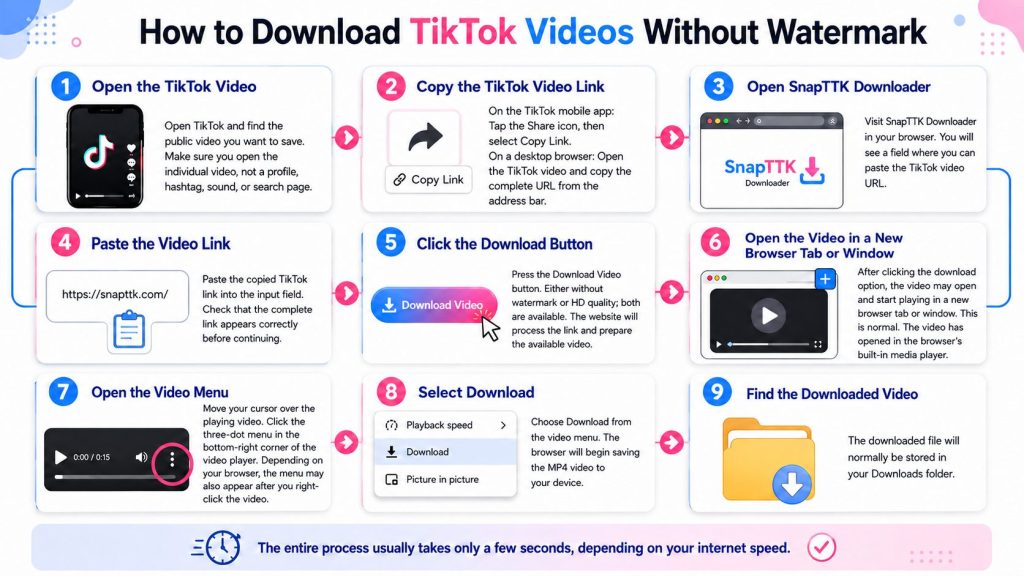
Step 1: Open the TikTok Video
Open TikTok and find the public video you want to save.
Make sure you open the individual video rather than a profile, hashtag, sound, or search page.
Step 2: Copy the TikTok Video Link
On the TikTok mobile app: >>Tap the Share icon. >> Select Copy Link.
On a desktop browser: >>Open the TikTok video. >> Copy the complete URL from the browser’s address bar.
Step 3: Open SnapTTK Downloader
Visit SnapTTK Downloader in your browser. You will see a field where you can paste the TikTok video URL.
Step 4: Paste the Video Link
Paste the copied TikTok link into the input field. Check that the complete link appears correctly before continuing.
Step 5: Click the Download Button
Press the Download Video button. Either without watermark or HD quality; both are available
The website will process the link and prepare the available video.
Step 6: Open the Video in a New Browser Tab or Window
After clicking the download option, the video may open and start playing in a new browser tab or window.
This is normal. The video has opened in the browser’s built-in media player.
Step 7: Open the Video Menu
Move your cursor over the playing video.
Click the three-dot menu that appears in the bottom-right corner of the video player.
Depending on your browser, the menu may also appear after you right-click the video.
Step 8: Select “Download”
Choose Download from the video menu.
The browser will begin saving the MP4 video to your device.
Step 9: Find the Downloaded Video
The downloaded file will normally be stored in your Downloads folder.
The entire process usually takes only a few seconds, depending on your internet speed.
If you are looking for an up-to-date TikTok video downloader that works smoothly in 2026, SnapTTK provides totally latest TikTok video downloader, a simple way to download public TikTok videos without watermark in the best available HD quality.
Why Use SnapTTK TikTok Downloader?
There are hundreds of TikTok downloaders available online, but not all of them provide a smooth user experience. Some websites are filled with intrusive ads, while others limit download quality or require unnecessary registration. SnapTTK focuses on speed, simplicity, and high-quality downloads.
With SnapTTK, you can:
No Login Required
You do not need to create an account, sign in, or connect your TikTok profile. Simply copy the link of a public TikTok video, paste it into SnapTTK, and start downloading.
Fast and Secure
SnapTTK processes TikTok video links quickly through your browser. You are not required to provide your TikTok password, verification code, or private account information.
Works on All Devices
SnapTTK is compatible with Android, iPhone, iPad, Windows, macOS, Linux, Chromebook, and other devices that support a modern web browser.
TikTok Video Downloader Without Watermark
A watermark can distract viewers and reduce the professional appearance of a video.
SnapTTK helps users download TikTok videos without the visible TikTok logo, making videos cleaner and easier to reuse for personal projects.
A watermark-free download is useful for:
SnapTTK focuses on providing a smooth downloading experience while maintaining available video quality.
Download TikTok Videos in HD Quality
Video quality matters when saving TikTok content.
SnapTTK helps download videos in the highest quality available from the original TikTok source.
Depending on the uploaded video, users may get:
Depending on the uploaded video, users may get:
The final resolution depends on the original video uploaded to TikTok.
Download TikTok Videos by Link
SnapTTK works through TikTok video URLs.
You don’t need technical knowledge or complicated settings.
The process is simple:
Copy → Paste → Download
This makes SnapTTK suitable for beginners as well as regular TikTok users.
Fast Downloads Without Waiting
Nobody enjoys waiting for long processing times. SnapTTK is optimized to process TikTok video links quickly, allowing users to download videos in just a few moments.
The exact speed depends on:
- Your internet connection
- TikTok server response
- Video length
- Current traffic
Most videos are processed within seconds.
TikTok MP4 Downloader
SnapTTK allows users to download TikTok videos in a commonly supported video format.
MP4 files can easily be played on:
This makes downloaded videos convenient for viewing and editing.
Common Download Problems and How to Fix Them
Sometimes a TikTok video may not download immediately. In most cases, the issue is easy to solve.
The Video Link Doesn’t Work
Double-check that you’ve copied the complete TikTok URL. Sometimes users accidentally copy an incomplete or broken link.
The Video Is Private
Private videos usually cannot be downloaded using public downloader tools because they aren’t publicly accessible.
Slow Internet Connection
If your connection is unstable, downloading may take longer than expected. Try switching to a stronger Wi-Fi or mobile data connection.
Browser Cache Issues
If the page isn’t loading correctly:
- Refresh the page
- Clear your browser cache
- Try another browser if necessary
Temporary Server Issues
Occasionally, TikTok or network services may experience temporary delays. Waiting a few minutes and trying again usually resolves the issue.
Tips for Better Download Quality
If you want the best possible results, keep these simple tips in mind.
- Always use the original TikTok video link.
- Download the video soon after copying the URL.
- Use a stable internet connection.
- Keep your browser updated.
- Avoid unofficial downloader websites.
- Download only public videos that you’re permitted to access.
These small steps can help ensure a smoother experience.
Is Downloading TikTok Videos Legal?
The legality of downloading TikTok videos depends on how the content is used.
Users should respect:
- Copyright ownership
- Creator rights
- TikTok platform guidelines
Downloading your own videos or saving content for personal use is different from redistributing someone else’s content without permission.
Frequently Asked Questions – Download TikTok videos without watermark
Final Words – Download TikTok videos without watermark
SnapTTK makes downloading TikTok videos simple, fast, and convenient. Whether you want to save videos for offline viewing, organize your own content, or keep useful clips, SnapTTK provides an easy browser-based solution.
With no app installation, no account requirement, and a simple download process, SnapTTK helps users save TikTok videos whenever they need them.